[ Caregiver App · Families ] · — Product 01

The Caregiver App for families.

Makes the family a full participant in their loved one’s care: the plan, the answers and the next step, built from the person’s own record and connected to the hospital, the home care agency or assisted living community, and the care manager.

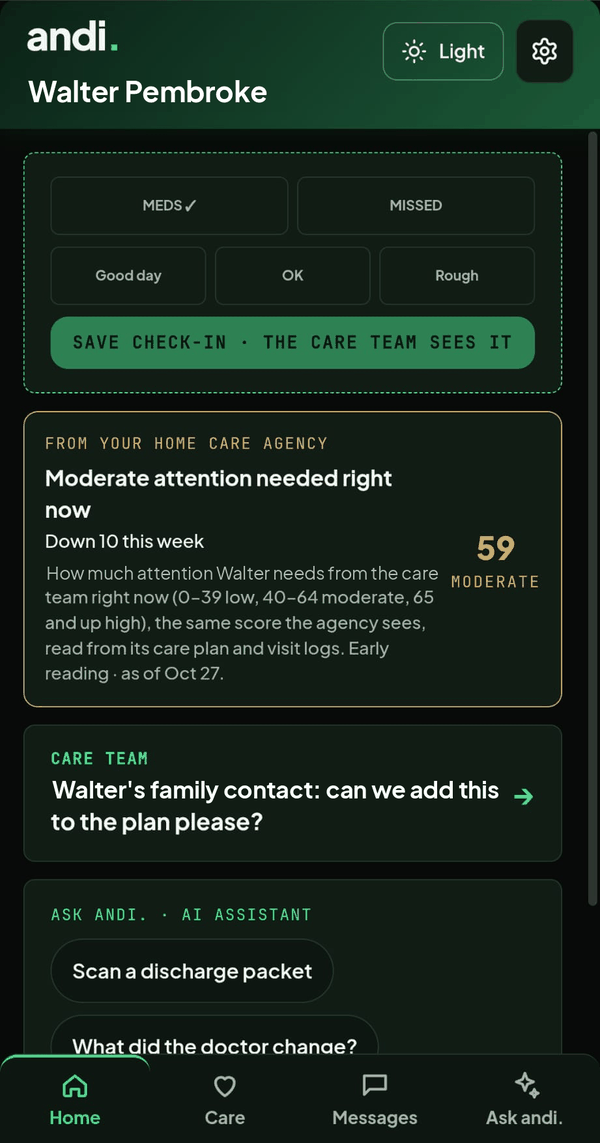
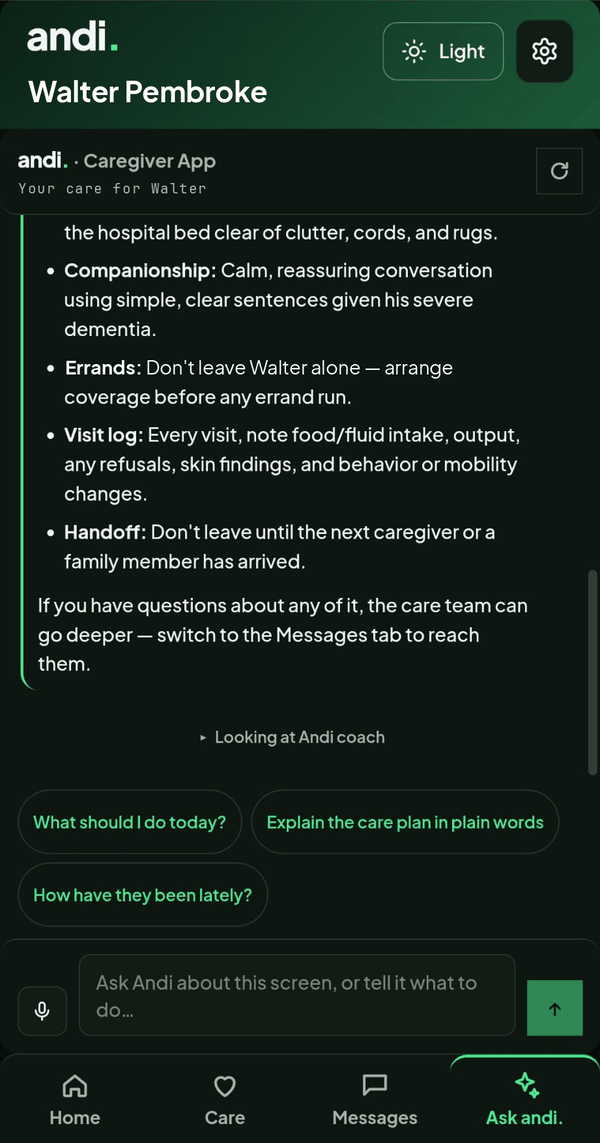
The Caregiver App home screen: a daily check-in, the attention score the agency sees, and a message from the care team. Synthetic data. Ask andi. in the Caregiver App: the care plan explained in plain words, with prompts to ask what to do today. Synthetic data.

Synthetic data · no real families

Read the packet

A photo or scan of the discharge papers becomes a day-by-day plan: medications, follow-up appointments, warning signs and who to call.

Ask anything, any hour

Plain-language answers drawn from the plan and the record. When a question needs a clinician, it tells you to call.

The care circle

Spouse, children, the sibling in another state. Each sees exactly what the family chooses to share. What a daughter notices on Sunday lands in the record.

Connected to the hospital

When the hospital runs Discharge Co-Pilot, the plan arrives in the app already open, and what the family notices at home reaches the case manager.

Connected to home care and assisted living

When the agency or community runs Care Navigator, the family sees the same living plan the nurse and scheduler work from: visits, changes, who is coming today.

Care Funding Navigator

The benefits and programs the family may qualify for, checked against the family’s own situation. Included.
[ How it starts ]

How it starts.

On the family’s own phone, the day the packet comes home. Agencies, communities and health plans can offer it to their families as a benefit.

Day 1

Download and scan

The discharge papers become the plan: medications by time of day, follow-ups, warning signs, who to call.

Day 2

Invite the circle

Children, a spouse, the sibling in another state. Each sees exactly what the family chooses to share.

Days 1–30

Ask, watch, share

Questions answered from the record. What the family notices lands in it. The plan adapts. A question the app should not answer goes to a person.

Day 30 on

The plan continues

Keep it as long as it is useful. Or get it through the agency, community or plan that already knows the family.

What a family gets · in plain terms
Fewer hospital trips
Fewer late-night calls
One plan
Less retelling
Funding found
[ Your family’s privacy ]

Your family’s privacy.

01

Your information stays yours

Only the people you add can see it, and each of them sees exactly what you choose to share.

02

Guidance, never diagnosis

Guidance only. When a question needs a clinician, it tells you to call.

03

A person steps in

Red flags and the questions an app should not answer go to a licensed person on the care team.

04

Protected like a medical record

Encrypted, stored in the United States, and never used to train the models.

[ Connected to the people who care for them ]

Connected to the people who care for them.

01 · Hospitals

Discharge Co-Pilot sends the plan home with the patient, already open in the app.

02 · Home care

Care Navigator: the agency’s living plan, visits and changes, visible to the family.

03 · Assisted living

Care Navigator: the community’s plan and updates, visible to the family.

04 · Care managers

GCM Platform: the care manager and the family on one record.

See it in action.

A live walkthrough of the Caregiver App from the people who built it, and who still operate in senior care every day.

Request a Demo